
We have all worked with arrays, and Arrays are the first collection on which every developer works on. Through this live, I have gone through various concepts, along with Practice Question on Array as well as 2-D Array.
NOTE: The live is recorded in two Parts, because there was some glich while recoding the 1st time.
What is Array?
- Continuous Memory Allocation
- Contains elements of Same Data Type
- Starts from 0 index
- Ends at index n-1, where n=no of elements/ size of array
- The size of array is fixed
Array is a fixed homogeneous collection of elements.
How is it stored?
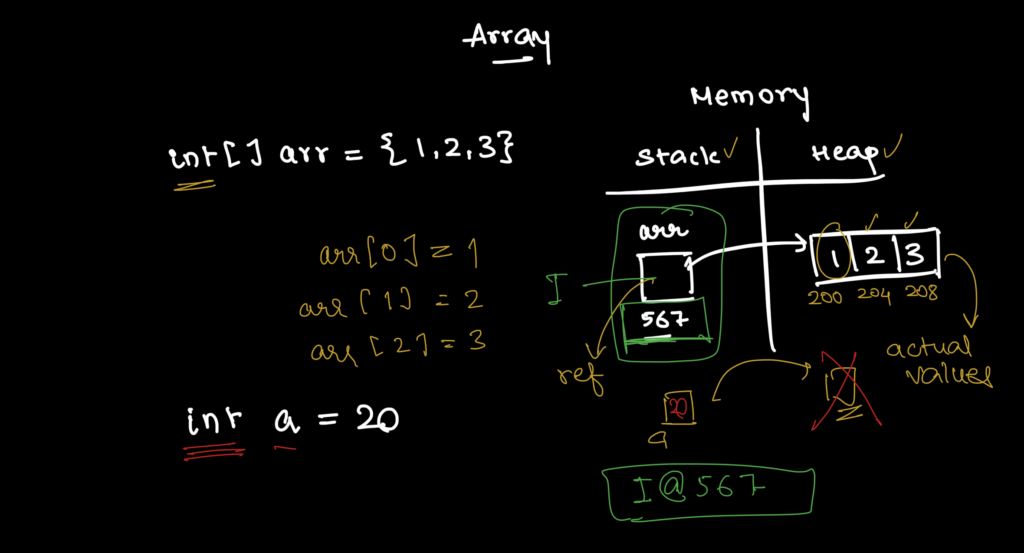
Heap Memory, Stack Memory, Reference, Values
How to Initialize an Array?
// 1. Declaration of Arrays
int [] intArr; // Array Declaration

// 2. Initialize
intArr = new int[5];

// 3. Initializing with values
int []newArr = {10, 20 ,30};
Printing the Array
// 1. Printing Values of Array
for (int i = 0; i < newArr.length; i++) {
    System.out.println(newArr[i]);
}

//  2. Printing with ForEach Loop
for (int i: newArr) {
    System.out.println(i);
}
Common Practice Questions to Practice Array
- Sum of all elements
    public static int sumArray(int[] arr) {
        int sum = 0;
        for (int i: arr) {
            sum += i;
        }
        return sum;
    }
2. Count Even-Odd Numbers in an Array
    public static void countEvenOdd(int [] arr) {
        int countOdd = 0;
        int countEven = 0;

        for (int i: arr) {
            if (i % 2 == 0) {
                countEven++;
            } else {
                countOdd++;
            }
        }
        System.out.println("Even: " + countEven + " | Odd: " + countOdd);
    }
3. Find Maximum Number
    public static int findMaximumNumber(int [] arr) {

        int maxNum = Integer.MIN_VALUE;
        for (int i : arr) {
            if (i > maxNum) {
                maxNum = i;
            }
        }
        return maxNum;
    }
4. Reverse Array
    // The WRONG Way
    public static int[] reverse (int[] arr) {
        int [] rev = new int[arr.length];
        for (int i = 0; i < rev.length; i++) {
            rev[i] = arr[arr.length - 1 - i];
        }
        return rev;
    }

    public static int[] betterReverse(int[] arr) {
        for (int i = 0; i < arr.length/2; i++) {
            int temp = arr[i];
            arr[i] = arr[arr.length - 1 - i];
            arr[arr.length - 1 - i] = temp;
        }
        return arr;
    }
5. Search Element in an Array
    public static boolean findElement(int[] arr, int element) {
        for(int i: arr) {
            if (i == element) {
                return true;
            }
        }
        return false;
    }
6. Check if Array is Sorted or Not
    public static boolean isSorted(int[] arr) {
        int prevElement = arr[0];
        for (int i = 1; i<arr.length; i++) {
            if (arr[i] < prevElement) {
                return false;
            }
            prevElement = arr[i];
        }
        return true;
    }
2D Array
There can be 2 types of 2D-Array:
The first one, where number of columns and number of rows are same.
And the other one, where each row, have different number of columns, They are also called Jagged 2D-Array
All the rules, and concepts which applies to 1D-Array are applied to 2D-Array.
        // 2d array, there are two indexes, i (row), and j (col)
        int [][] arr2d = new int[3][3];

        // Initializing values in array
        int value = 1;
        for (int i = 0; i < 3; i++) {
            for (int j = 0; j < 3; j++) {
                arr2d[i][j] = value++;
            }
        }
Printing the Array
        // Printing the array
        for (int i = 0; i < 3; i++) {
            for (int j = 0; j < 3; j++) {
                System.out.print(arr2d[i][j] + " ");
            }
            System.out.println();
        }
Taking Inputs for Dynamic 2D-Array and and storing the values in it.
    public static int[][] takeInputs() {
        Scanner scanner = new Scanner(System.in);

        System.out.print("Please enter row count: ");
        int rowCount = scanner.nextInt();

        int [][] jArray = new int[rowCount][];

        int colCount;
        for(int i = 0; i < rowCount; i++) {
            System.out.print("Enter column count for row #" + (i+1) + ": ");
            colCount = scanner.nextInt();
            jArray[i] = new int[colCount];
        }

        // Take Values for each element
        System.out.println("Now Please Enter Values for each element:");
        for (int i = 0; i < jArray.length; i++) {
            for (int j = 0; j < jArray[i].length; j++) {
                System.out.print("Enter Value for " + i + "X" + j + " : ");
                jArray[i][j] = scanner.nextInt();
            }
        }
        return jArray;
    }
Printing the 2D-Array
    public static void printArray(int [][] jArray) {
        System.out.println("\nPrinting the 2D-Array:");
        for (int i = 0; i < jArray.length; i++) {
            for (int j = 0; j < jArray[i].length; j++) {
                System.out.print(jArray[i][j] + " ");
            }
            System.out.println();
        }
    }
Sum of 2D-Array
    public static int sumOfElements(int [][]arr) {
        int sum = 0;
        for (int i = 0; i < arr.length; i++) {
            for (int j = 0; j < arr[i].length; j++) {
                sum += arr[i][j];
            }
        }
        return sum;
    }
By doing these practices, we were able to brush up on the array of knowledge, and I hope this will help you as well while solving the array related questions.